Prepare the two subjects
Save the campaign’s main subject as A. In Subject A/B experiment, enable the experiment and enter Subject B. This changes the subject only; keep the body and audience appropriate for either version.
Choose a total sample from 10–80%. Stable random assignment divides it between A and B probabilistically, so small audiences may not fill both groups evenly. Each subscriber still has one campaign queue item.
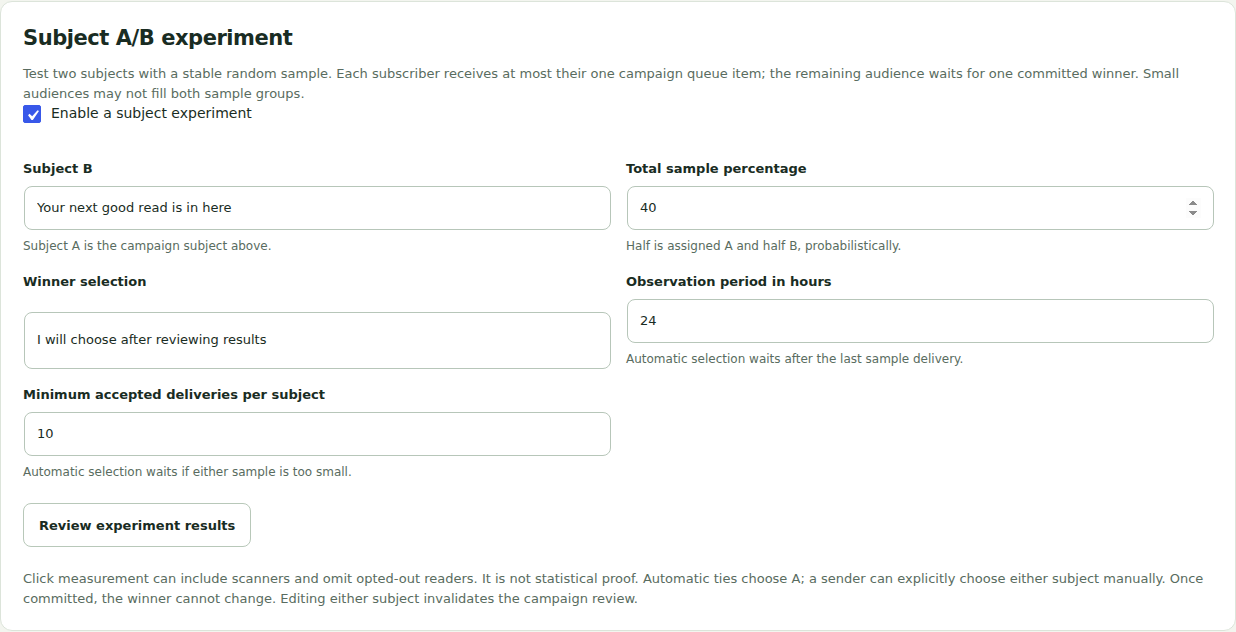
Choose how to select a winner
Select a manual decision or the higher observed click rate. Automatic selection requires optional click measurement, an observation period of 1–168 hours after the last sample acceptance, and a minimum of 1–10,000 accepted deliveries per subject.
Scanners and small samples can distort the result. The plugin does not calculate statistical significance or certify that a click came from a human. Avoid interpreting a tiny difference as proof of a better subject.
Review and schedule the campaign
Save, inspect tests for the intended message, rehearse and obtain any required independent approval. Schedule through the normal campaign flow. The sample is released first; the rest waits for one committed winner.
Automatic selection waits while sample items remain queued, retrying, processing, paused or uncertain. Too few accepted deliveries also hold it. Resolve the underlying condition rather than forcing retries.
Commit the winner deliberately
Open the experiment results to compare accepted counts and observed requests. An authorized sender can explicitly confirm a manual winner, including before an incomplete sample finishes. That choice releases otherwise eligible remaining recipients through the ordinary queue.
A committed winner cannot be changed. Automatic ties choose A. No experiment bypasses consent, preferences, suppression, required approval or site sending holds.