Open saved audiences
In a campaign’s audience step, choose Open saved audiences → Create saved audience. Give the selection a useful name, such as “Workshop readers without a recent order.” Pro supports up to 100 named audiences with 1–10 rules each.
Choose AND or OR deliberately
Use AND — every rule must match for an intersection, such as a workshop tag plus a chosen signup source. Use OR — at least one rule must match for alternatives. Each rule can match or not match; the rules are flat, without nested groups.
Rules cover tags, exact signup source, a paid purchase, repeat customer, selected product and lapsed customer. Search products by name. Purchase rules require available WooCommerce history and fail closed when that history is unavailable.
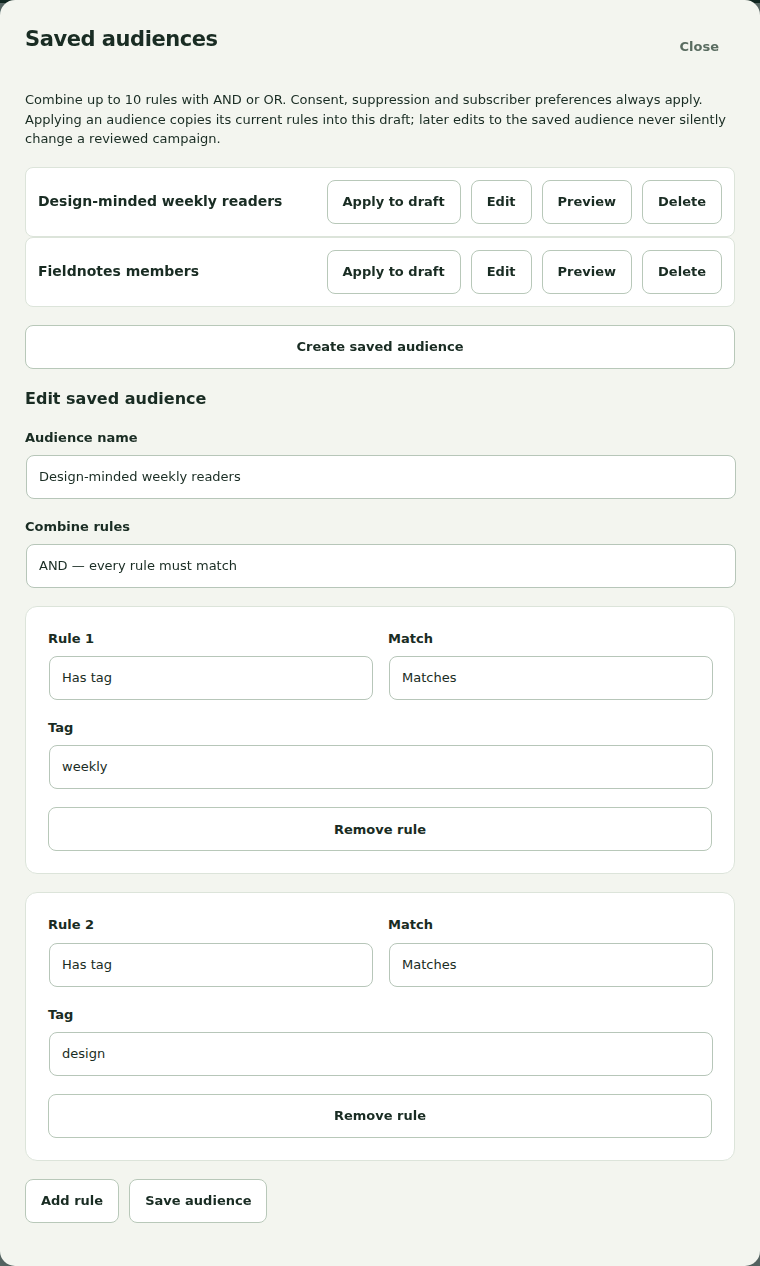
Preview before applying
Choose Save audience, then Preview to run a resumable eligibility review. Check counts and exclusions, and inspect examples only if your role has audience access. Consent, suppression and preferences always apply, regardless of the rules.
Choose Apply to draft when the selection is right. It combines with the campaign’s other filters and topics, so run a fresh campaign rehearsal afterward.
Understand the copied rules
Applying a saved audience copies its current reviewed rule revision into the draft. Later edits to the reusable audience do not silently change that campaign. Reapply an updated audience explicitly when wanted, then save and repeat the necessary test/review steps.
Use Remove saved audience rules to clear that snapshot deliberately. Removing Pro or leaving invalid dependent rules cannot widen recipients into an unrestricted audience.