Define the topics you actually publish
An administrator opens Settings → Subscriber topics. General news is always available; add up to 20 custom topics using one stable-id | Display name per line, then choose Save topics. For example: workshops | Workshops and events. Keep stable IDs when renaming a topic so existing choices continue to mean the same thing.
Choose topics for the campaign
In the audience step, select the campaign’s Email topics. Recipients must match a selected topic and all other eligibility rules. If no campaign topic is selected, General news is used. Choose the topic that reflects the content; a topic label does not create marketing consent.
Let the subscriber choose
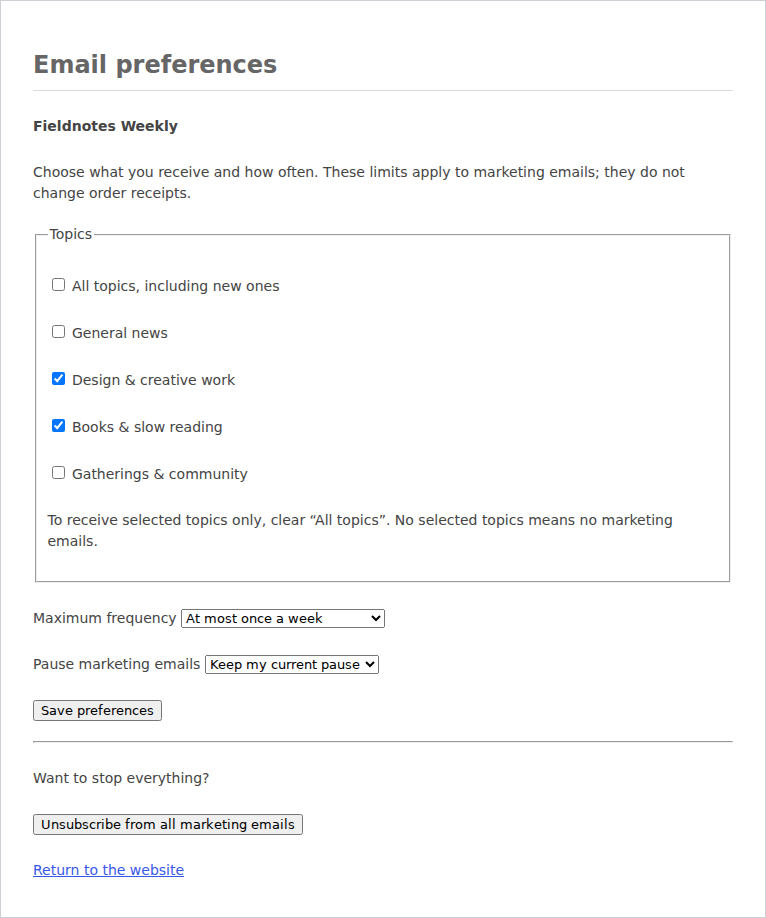
Each marketing email includes an Email preferences link. Opening the signed link only displays the page. The subscriber can choose all current/future topics or specific topics, set as-published, daily, weekly or every-30-day frequency, and pause for 7, 30 or 90 days before saving.
Selecting no subscriber topics means no marketing. Frequency is a maximum pace, not a promise of a digest at that interval. The separate unsubscribe action remains visible and effective.
Respect the choice when sending
Topics, pauses and frequency are checked again at delivery alongside consent and suppression. Saving preferences cannot reactivate an unsubscribed address, and a CSV update cannot overwrite these protections. Preferences apply to marketing, not order receipts.
Authorized audience users can inspect the saved choices on a contact. The subscriber controls the choices through their signed link; protect that link like any private account-free access link.